PRODUCT DESCRIPTION
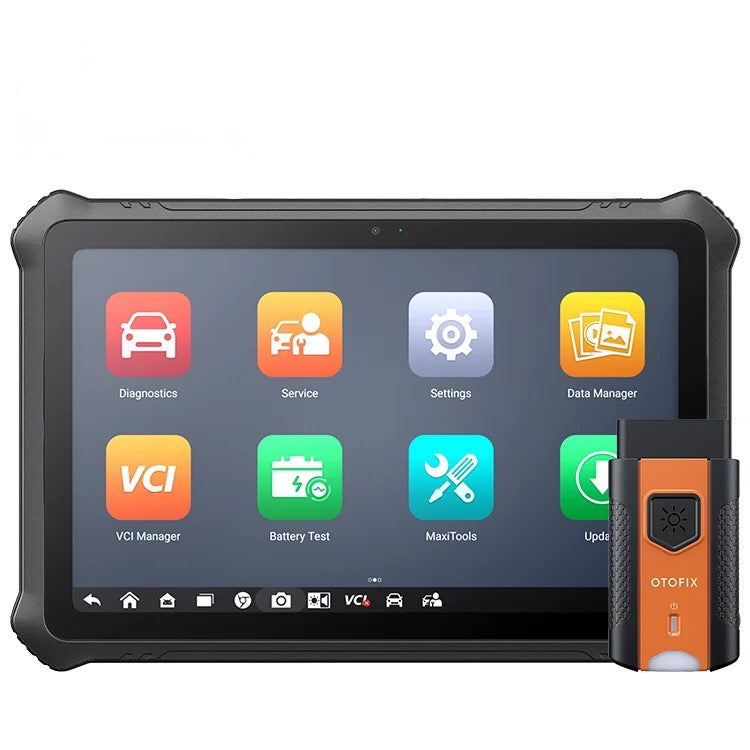
OTOFIX D1 Max2 – Professional Bi-Directional Diagnostic Scan Tool
The OTOFIX D1 Max2 is an advanced professional automotive diagnostic scan tool designed for workshops and technicians requiring comprehensive full-system diagnostics, bi-directional active tests, advanced service functions and ECU coding capabilities.
Featuring a large 10.1-inch touchscreen, 8-core processor, 4GB RAM, 128GB storage and massive 11,600mAh battery, the D1 Max2 delivers powerful professional diagnostics with support for 10,000+ vehicle models.
With CAN FD and DoIP protocol support, the D1 Max2 is designed to handle both current and newer vehicle communication systems without requiring additional protocol adapters on supported vehicles.
OE-Level Full-System Diagnostics
- Full-system vehicle diagnostics
- Read and clear diagnostic trouble codes
- Live vehicle data
- ECU information
- Auto vehicle identification
- Comprehensive vehicle scanning
- Diagnostic report generation
- Cloud-based report management
- Coverage for 10,000+ vehicle models
- Extensive Asian, European, American and Chinese vehicle coverage
Bi-Directional Active Tests
The D1 Max2 supports bi-directional control on compatible vehicles, allowing technicians to send commands directly to vehicle systems and components to assist with accurate fault diagnosis.
Active tests can include supported:
- Actuators
- Valves
- Pumps
- Relays and solenoids
- Cooling fans
- Lighting systems
- Windows and electrical components
- Other vehicle-specific components and systems
Available active tests vary depending on vehicle make, model and year.
Advanced ECU & VAG Functions
The D1 Max2 provides advanced functions on supported vehicles, including:
- ECU coding
- Volkswagen and Audi guided functions
- Volkswagen and Audi online IMMO functions
- Hidden function renewal
- Advanced vehicle-specific coding and adaptation functions
ECU coding and advanced functions vary depending on vehicle compatibility.
Comprehensive Service & Maintenance Functions
The D1 Max2 supports an extensive range of workshop service functions, including:
- Oil reset
- Electronic parking brake reset
- TPMS functions
- Battery management system reset
- Brake bleeding
- Aftertreatment functions
- IMMO/key functions
- Injector functions
- Steering angle sensor functions
- Suspension functions
- Throttle functions
- Window, door and roof functions
- Seat functions
- Odometer functions
- Language change
- Headlamp functions
- Tyre size change
- TEC learning
- ABS/SRS functions
- Cylinder functions
- VGT learning
- Speed and PTO functions
- Clutch functions
- Transmission adaptation
- Airbag reset
- Air/fuel settings
- Automatic start/stop functions
- Electronic water pump activation
- EGR functions
- VIN functions
- FRM reset
- Transport mode
- High-voltage battery functions
- ACC functions
- Air-conditioning functions
- Rain/light sensor functions
Available service functions vary depending on vehicle.
CAN FD & DoIP Support
The D1 Max2 supports modern CAN FD and DoIP vehicle communication protocols, providing compatibility with a growing range of newer vehicles and faster vehicle communication on supported applications.
OTOFIX D1 Max2 Specifications
- Processor: 8-Core
- Operating System: Android 10
- Memory: 4GB RAM
- Storage: 128GB
- Display: 10.1-inch touchscreen
- Resolution: 1920 × 1200
- Battery: 11,600mAh
- Camera: 13MP rear camera
- Connectivity: USB / Bluetooth
- Wi-Fi: Wi-Fi 5
- Vehicle Communication Interface: OTOFIX V1
- CAN FD Support: Yes
- DoIP Support: Yes
- Working Temperature: 0°C to 45°C
- Storage Temperature: -10°C to 60°C
MaxiFix Cloud Solution
The D1 Max2 includes OTOFIX's MaxiFix cloud solution for diagnostic report and device management. Diagnostic and maintenance reports can be stored in the cloud, allowing technicians to access previous device and test records when required.
Vehicle Compatibility
Diagnostic functions, active tests, service functions and ECU coding capabilities vary depending on vehicle make, model and year.
If you have a particular vehicle or function you need the D1 Max2 to perform, contact Discount Tools NZ with the make, model, year and required function and we'll check compatibility before purchase.